Review & diffs
The Review tab is a PR-style diff of a session's worktree against its base branch, where you leave inline comments the agent acts on.
The diff view
The header shows the base ref and totals — 15 changed files vs. origin/main with a green +234 / red -56 count across the whole diff. When the base branch has an upstream, Plexus compares against the remote-tracking ref (origin/<base>) so the view mirrors a pull request; a purely-local base compares against the local ref.
The tab is a resizable two-pane layout: a file list on the left, the selected file's diff on the right. Drag the divider to set your width — it's remembered between sessions.
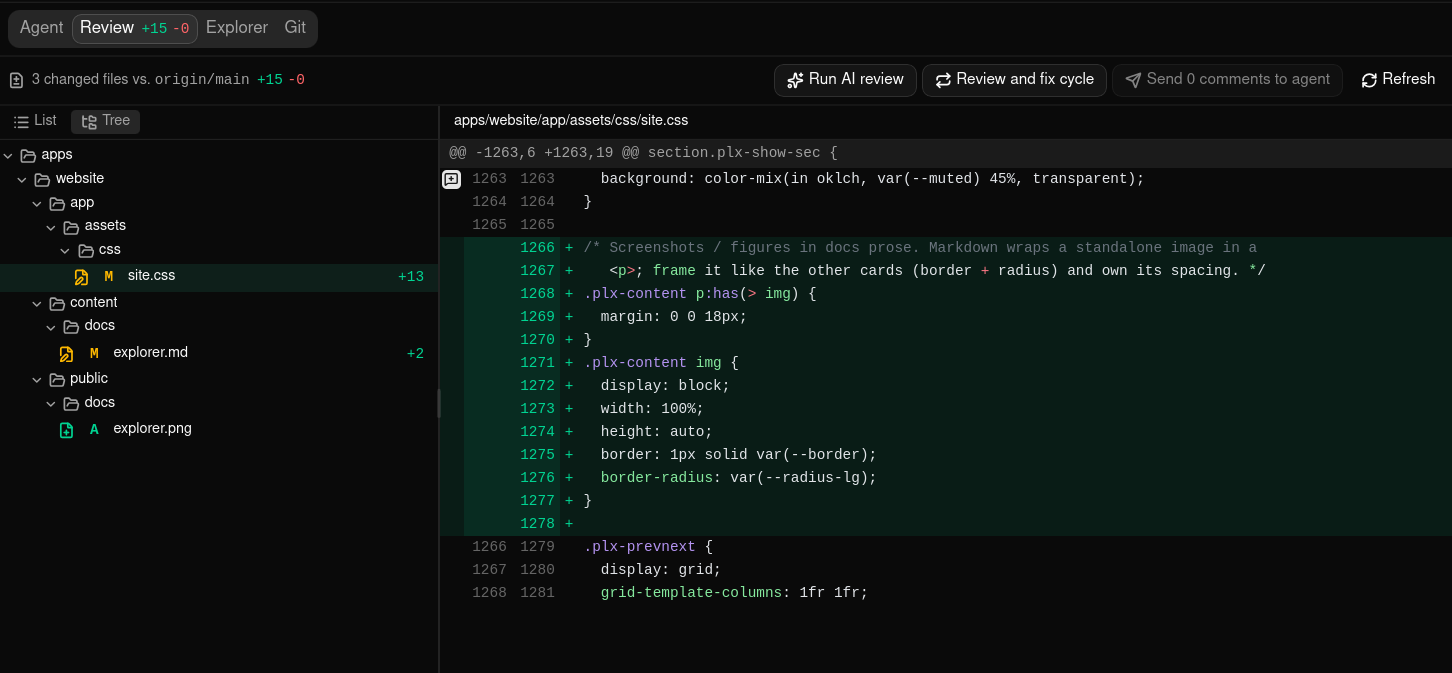
File list
Each row shows the change type (A added, M modified, D deleted, R renamed, C copied), the path, its +/- line counts, and two comment badges: a speech bubble counting the file's open comments, and a check counting its resolved ones. Each appears only when it has something to count, so a file whose comments have all been resolved still says so on the list instead of reading like a file nobody ever opened, and a file with no comments at all shows neither. Your own notes count one apiece; a pull request thread counts once however many replies it carries. Untracked files appear marked A so you can review new files alongside tracked ones. Toggle the sidebar header between a flat list (with dimmed directory paths) and a directory tree — switching is instant and keeps your selection.
Click a file to load its diff.
Hunks
Each file renders as diff hunks — a @@ header, line numbers, and context, added (green), and deleted (red) lines. Lines are syntax-highlighted and upgrade from plain text to colored tokens once the grammar loads, so the view never blocks — see Supported languages.
The bar above the diff switches between two layouts. It stays pinned to the top of the pane as you scroll, so you can switch from anywhere in a long file:
- Unified — a single column with the old and new lines interleaved, each row carrying a
+/-marker and both line numbers. - Split — the old file on the left, the new file on the right, with each deleted line opposite the line that replaced it. Where one side has no counterpart — a pure addition or deletion — the other column shows a blank cell.
In both layouts, when a deleted line is paired with its replacement Plexus marks the words that actually changed inside the line, so a one-character edit doesn't read as a whole-line rewrite. On a hunk that rewrites hundreds of lines at once the word marks are skipped — the red/green line tint already tells that story, and skipping keeps the diff quick to open.
Inline comments work the same either way. In split view the comment button appears on the side a comment anchors to — the left column for a deleted line, the right column for added and unchanged lines — so you can comment on either version of a modified line.
Your choice is remembered and applies to every diff in the app, including the read-only diffs in the session Git tab and the project Git client.
Binary files and files over the size limits (512 KB or 5000 changed lines) show a placeholder instead of a preview. They still appear in the list with their stats.
Reviewing someone else's branch
You don't have to have written the code to use this tab. Create a session on an existing branch — a colleague's branch, or the head of a pull request you've been asked to look at — set Compare with to the branch it's meant to merge into, and the Review tab becomes a full read of their work: the file list, the diff, your own inline comments, the AI review, and, once that branch has a pull request, its review conversation, where you can reply and resolve without leaving Plexus.
Because the session gets its own worktree, reading someone's branch costs you nothing: your main checkout and your other sessions stay exactly where they were. And if reading turns into fixing, the agent is already sitting in the Agent tab with that branch checked out.
Committing on a branch someone else also has is ordinary work. Rebasing or squashing it is not — that rewrites history they may already have pulled. Plexus warns rather than stopping you, and its Push is never a force-push, so a rewrite stays on your machine until you deal with it deliberately. See Git workflow.
Supported languages
The diff view highlights the file types below. Anything else — including a grammar that hasn't finished loading yet — stays readable as plain text.
| Language | File types |
|---|---|
| C | .c, .h |
| C++ | .cpp |
| CSS | .css |
| Go | .go |
| HTML | .html |
| Java | .java |
| JavaScript | .js, .jsx |
| JSON | .json, .jsonc |
| Markdown | .md |
| Python | .py |
| Rust | .rs |
| SCSS | .scss |
| Shell | .sh, .bash |
| SQL | .sql |
| TOML | .toml |
| TypeScript | .ts, .tsx |
| Vue | .vue |
| XML | .xml |
| YAML | .yaml, .yml |
The editor in the Explorer tab recognizes many more languages; the diff view focuses on this set.
Inline comments
Hover a diff line and click the comment button to open the composer, type your note, and click Add. Comments anchor to a specific line on the old or new side (GitHub convention) and appear in a thread below it. Each carries Edit, Resolve, and Delete actions — plus Publish to the pull request once the session's PR conversation has loaded — and is labelled User when you wrote it or Plexus Review Agent when the AI review inserted it. Resolving strikes the comment through and moves it from the file's open badge to its resolved one, so the file list keeps a record that the file was worked over.
Notes keep their layout: paragraphs, nested lists, indented code blocks and the alignment inside them survive into the Review tab and onto a pull request. Two things are bounded on the way in — a run of spaces is kept up to 16 columns, and a run of blank lines up to two. (The prompt the agent gets still folds each note onto one line.) A very long note is scrollable in its thread rather than pushing the diff off screen.
These are private notes until you decide otherwise: they stay on your machine and exist so the agent can read them, and nothing leaves your machine unless you publish one to the pull request — which hands that note to GitHub or Bitbucket and consumes your local copy. The comments other people leave on a pull request are a separate conversation with its own authors and its own Resolve — see Pull request comments.
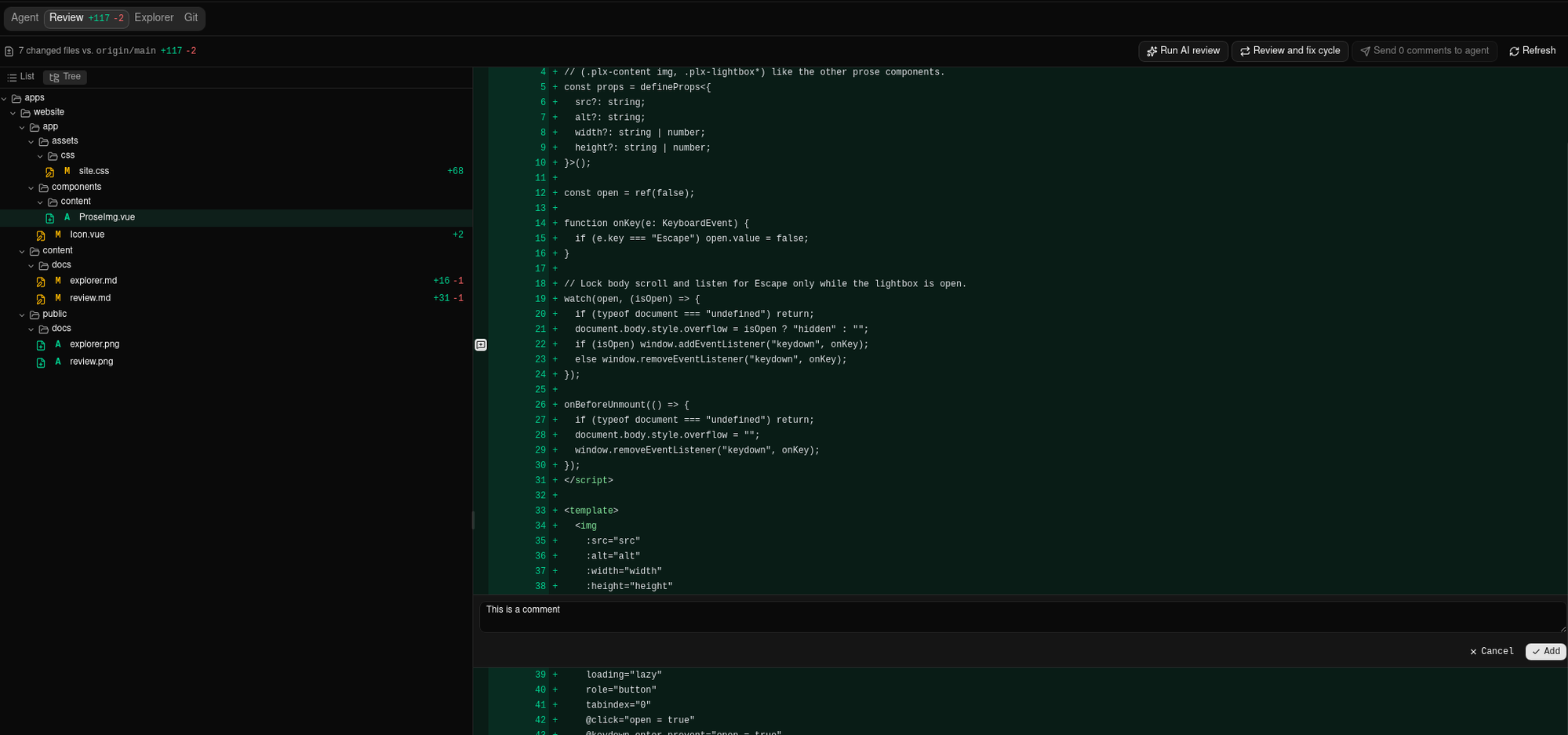
Comments are advisory context: if the agent edits a file, line numbers can drift, but your comments stay editable. If an edit removes a file from the diff entirely, its comments become orphaned — a banner at the top lists them by file:line with Resolve and Delete buttons so you can tidy up.
Send comments to the agent
With unresolved comments open, the header shows a Send N comments to agent button. Clicking it formats every open comment into one prompt and writes it to the running agent, where Claude reads it as input on its next turn and iterates. The send resolves what it sent, so those comments stop counting toward the button and move to each file's resolved badge — handing your whole review over leaves the file list reading as a count of resolved comments per file, rather than emptying it. The session must be running with a live agent — if it's stopped, start it first (see Agent).
That button sends your notes. Comments from the pull request are sent separately, from their own buttons — see Send PR comments to the agent.
Pull request comments
Once a session has a pull request, the review conversation moves to GitHub or Bitbucket — and Plexus brings it back into this tab. A message icon in the Review header toggles it on and off. The icon only appears for a session that has a PR, carries a count of the unresolved threads when there are any, and starts out on; your choice then applies to every session and is remembered across restarts.
The PR conversation renders beside your own notes, never merged into them. Each keeps its own thread, its own author, and its own Resolve — resolving a PR thread is a public action on the pull request, while resolving one of your notes is private bookkeeping.
Where the comments appear
- Under the diff line they're about. A thread whose file and line match the current diff renders below that row, under any local notes, on a tinted background. Its header always shows the provider's own
path:line, chips for Resolved and Outdated, and a link that opens the thread in your browser. In split view a row spans both columns, so its threads sit below the pair — an old-side thread and a new-side one on the same row appear together, each listed once. - In the Pull request conversation section. A collapsible section above the diff collects everything that has no home on a line: comments on the pull request itself, review verdicts (Approved, Changes requested, Dismissed, Commented) together with the summary the reviewer wrote — a decision left without a summary still appears, as just the reviewer's name and the verdict — threads the provider marked outdated, and threads on files that aren't in the current diff. Nothing is dropped silently — a comment Plexus can't place confidently is listed here instead of guessed onto a line.
The section starts collapsed, so a busy pull request never buries the diff you came to read. Its header still tells you what's inside without opening it: a count of the items in the section, an Approved or Changes requested chip when a reviewer left a verdict, a warning triangle when only part of the conversation was fetched, and both Comment on the PR and Send N PR comments to agent. Click the row to open it. Opening is for the visit you're on — leave the tab and come back and the section is closed again, so the diff is always what greets you. Opened, the section never takes more than about 40% of the tab — past that it scrolls while its header stays put, so the diff below it stays on screen.
Comment on the PR opens its box in a row of its own, below the section and outside that limit, so writing a comment never competes with the conversation for room — it doesn't open the section either. On a very short window the box gets a scrollbar of its own rather than pushing its own buttons out of reach. Collapsing the section while you write is a way to make room, and your text stays put when you do.
The verdict chip reports where this app last saw the review standing, which is not the same as GitHub's merge gate — it doesn't know about required approvals or code owners. Each reviewer's most recent decision counts, so an approval replaces that same reviewer's earlier Changes requested, and one reviewer still asking for changes outweighs anyone else's approval. Approving without writing anything counts just the same — it appears as a one-line entry with the reviewer's name and the chip. - In the file list's badges. While the conversation is shown, each file row's two comment badges count the pull request's threads for that file alongside your own notes — open threads in the speech bubble, resolved ones in the check. Hide the conversation and they go back to counting only your notes, so a badge never points at a comment the tab isn't showing you. A thread that no longer lines up with the diff is counted on its file too, and you'll find it in the conversation rather than on a diff line.
Reply and resolve
- Reply — click Reply on a thread, write your answer, and click Reply again. It's posted to the pull request as a reply in that thread.
- Resolve / Unresolve — the button is only there when the provider says you're allowed. GitHub permits resolving if you have write access to the repository or you opened the PR, so on someone else's repository you'll see no button rather than one that fails.
- Open in browser — every thread links out to its permalink for anything Plexus doesn't do, such as editing, reactions, or attachments.
Post a new comment
Once a PR exists, the line composer grows a target switch. Leave it on Note for the agent — the default, and exactly what the composer always did — or pick Comment on the PR to start a new review thread on that line, visible to everyone on the pull request. The button changes to Comment, and Plexus waits for the provider to confirm before the thread appears, so a comment you see is a comment that landed.
The switch appears per comment and always starts on Note for the agent, so posting publicly is never something you do by carrying over a previous choice.
Publish a note to the pull request
A note you already wrote — or one the AI review wrote for you — can be published to the pull request after the fact, as an inline comment on the same file and line. It's the other half of Post a new comment: that one decides where a comment goes as you write it, this one moves a note you have already read, edited, and decided is worth showing a reviewer.
- One note. The publish button sits in the note's own row of actions, beside Edit, Resolve and Delete.
- The whole review. The Review header carries a publish button with a count. It sends the session's unresolved notes, up to 40 at a time — with more than that the dialog says which it will send ("the first 40 of 57") rather than truncating silently, and you can publish again for the rest.
Either way, Plexus asks first: a confirmation lists the notes going out and names the repository as owner/repo#number, so you can see exactly where they're about to land. Nothing reaches the pull request until you confirm.
Both appear only once the pull request's conversation has loaded, only while PR comments are shown, and only while the PR is open — a merged or closed pull request takes no new comments, so the buttons aren't there to offer.
Stopping a batch. While the whole review is going out, the header's publish button turns into a Stop. It stops at the next note: the one already on its way still lands (and is still consumed), and everything after it is left alone — the same as if the provider had cut the batch short. Publish again when you want the rest.
Publishing consumes the note. When the comment lands, your local note is deleted and the pull request's own thread renders on that line in its place. That's what keeps the two halves of the tab from doubling up, and it means there is no undo from Plexus: edit or delete the comment on GitHub or Bitbucket, the same as any other comment you left there.
Resolved notes can be published too. Sending comments to the agent resolves everything it sends, and so does each round of the review-and-fix cycle — so the notes most worth showing a reviewer are often exactly the resolved ones. The bulk button is the exception: it sends only what's still unresolved, and it skips notes whose file has left the diff (the orphaned ones), since there's no line left to anchor them to. That's why its count can be lower than the one on Send N comments to agent.
A note the review agent drafted says so. Its published comment opens with an italic line — Drafted by the Plexus review agent. — above the note itself, so anyone reading the thread knows the finding came from a model rather than from you. Notes you wrote go out exactly as written, with no marker, the same as Comment on the PR.
A line that isn't part of the pull request's diff yet is refused by the provider — usually because the change is still uncommitted or unpushed. Plexus keeps those notes and tells you which ones didn't land, so you can commit, push, and publish again.
A bulk publish goes out one comment at a time, paced so a large batch doesn't trip the provider's rate limit. If it does hit a rate limit or an authentication problem, it stops there and reports the rest as untried rather than pressing on against a provider that has said no.
A published comment is public to everyone on the pull request and is posted under your own provider account. The confirmation shows you the exact text and the repository it's going to — read it before you confirm, including anything the review agent wrote for you.
Send PR comments to the agent
Send to agent on a single thread hands that conversation to the running agent. Send N PR comments to agent in the conversation header sends every unresolved thread it hasn't sent yet. Either way Plexus folds them into one prompt — introduced as review comments from pull request #N, one entry per thread with its file:line and its replies — writes it to the live agent, and switches you to the Agent tab. Threads you've already sent are chipped Sent so you don't send them twice.
Sent lasts as long as the agent that received it. Stop the session, resume it, or lose the agent to a crash, and every thread it was handed becomes sendable again — a prompt written to a terminal that no longer exists was never read, so Plexus stops claiming it was delivered. The header button stays where it is once everything has been sent: it goes quiet and says so, rather than disappearing.
A thread the provider marked outdated or resolved carries that word in the prompt, next to its file:line, so the agent gets the same caveat you do: an outdated line number points at whatever code sits there now.
Sending changes nothing on GitHub or Bitbucket. If you'd like those threads resolved once the agent has worked on them, turn on Resolve PR comments after the agent fixes them (Settings → Git & PRs, default Off); see Settings. It resolves a thread only if the agent that was given it finishes the turn — resuming the session drops anything the previous agent never saw.
One prompt carries a bounded amount of conversation, so a very busy pull request doesn't bury the ask in a wall of quoted text. If a send doesn't fit, the prompt ends with … N more comments not included — the threads it left out stay unsent (no Sent chip), so sending again picks up where it stopped.
That setting resolves the threads the moment the agent's turn ends. That's a claim that the agent finished, not that the change is correct or pushed — you still review the diff and push it yourself. Resolving is visible to the PR's author and its other reviewers, which is why nothing else in Plexus ever does it for you.
Keeping them up to date
Plexus fetches the conversation when you open the Review tab, when the Plexus window regains focus, and when you click Refresh — there's no background polling, so reading a review never costs you a request you didn't ask for. Reopening the tab within a short window reuses what was already fetched; Refresh always goes to the provider.
What to expect
- Line anchors are advisory. This tab diffs your worktree, while the pull request anchors its comments to its head commit. Uncommitted or unpushed work can shift a line by a few, so every thread prints the provider's own
path:linenext to the code — compare the two if a comment reads oddly against the line it's sitting on. - An inline comment has to land on a line that's part of the PR's diff. GitHub rejects anything else; when that happens Plexus says so and suggests committing and pushing first, or commenting on the PR conversation instead. The same applies to a published note, which is kept locally when the provider refuses it.
- Pull requests opened from a fork aren't supported yet. Plexus looks for the pull request on the repository itself, so a PR whose branch lives in a fork isn't found and no comments appear for it.
- Images in comments aren't loaded. Comment bodies render as markdown with remote images stripped, so opening a review never fetches anything from a third-party host. Open the thread in your browser to see them.
- Very busy pull requests are fetched up to a limit. If it's reached, the conversation section's header carries a warning triangle even while it's collapsed, and the section itself says only part was fetched and links you out for the rest.
- Bitbucket has no review verdicts. Its reviewers leave ordinary comments, so those arrive as PR-level threads rather than as Approved / Changes requested entries.
AI review
Click Run AI review to hand the diff to a headless Claude instance that reviews it for bugs, security issues, and risky changes, then posts inline comments as the Plexus Review Agent. A spinner shows while it runs — anywhere from under a minute to several, depending on the size of the diff, the length of your review instructions, and which model and effort level it resolves to. When it finishes, a banner reports how many comments were added. Treat them like your own — edit, resolve, or send them to the interactive agent.
Customize the review prompt
The brief the reviewer follows is fully yours. The AI code-review instructions setting (Settings → Git & PRs) is the review instruction — it decides what the model looks for and how to weigh it. The default reads:
You are a senior engineer reviewing this pull request diff. Flag correctness bugs, security issues, and risky changes as concise, actionable inline comments. Do not rewrite the code.
Replace it with whatever fits: focus on your project's conventions, ignore a class of issue, enforce a style guide, or even ask for the comments in another language. Set it once globally for every repository, or override it per workspace or project so each codebase gets its own reviewer (see Settings).
You never have to spell out a response format. Plexus wraps your prompt with the diff — every line tagged with its file, side, and line number — and hands the model a strict output schema, then turns the reply into comments anchored to the exact lines. The schema isn't a request: it constrains what the model is able to produce, so the reply comes back in the right shape even if your instructions invite prose or your global Claude Code setup would otherwise reshape the answer. Your prompt decides what gets reviewed; Plexus guarantees how the results come back, so a custom prompt can't misplace or break comments.
If a reply is cut short — a very large diff can hit the model's output limit — Plexus keeps every complete comment rather than discarding the batch, and it still retries once if a reply can't be read at all. When one can't, the result banner offers Copy reply, which gives you the reply as it arrived (very long ones are trimmed, with a note saying how much was left out).
Review-and-fix cycle
The Review and fix cycle automates the whole loop unattended: it runs an AI review, spawns a separate headless agent to apply the fixes, waits for it to finish, then re-reviews — repeating until the review finds no issues or it hits the round limit. Each round that actually runs resolves the comments it handed to the fix agent, exactly as a manual send does, so when it's over the file list reads as a count of resolved comments per file — a record of what the cycle worked on, rather than a sidebar back to blank. A round whose agent never started leaves its comments open instead, so nothing is marked done on the strength of work that didn't happen.
- Consent (once per repository). The first run for a repository opens a dialog explaining that the cycle runs an unattended, non-sandboxed agent that can edit files without approval. Confirm to proceed; each repository is treated independently.
- Activity warning. If the interactive agent still looks mid-turn, a dialog warns the two agents could conflict in the same worktree. The signal is best-effort, so you can Cancel or Start anyway.
- Status strip. While the cycle runs, a strip below the file list shows the current round and phase (reviewing or fixing), then the terminal result. A Stop button halts it gracefully at any time.
- Watch the agent. A cycle can run for a long time, so Watch agent — in the status strip and in the session header, alongside Stop — opens a panel at the bottom of the session. The top half is a running account of the cycle: which round it is on, how many files the review is reading, when it asked the model, how many comments came back, and how long each phase took. The bottom half is a live, read-only terminal on the fix agent itself, so you can see exactly what it is editing. Both buttons appear only while a cycle is running; the panel has its own close button, so it stays open on the finished round until you dismiss it.
- A failed round doesn't end the run. If a review round fails for a passing reason — the model is rate-limited or overloaded, or its reply couldn't be read — the cycle notes it, skips that round, and reviews again on the next one. Only a failure that can't improve on retry (the
claudeCLI isn't installed) stops it immediately. A failed review is never reported as "no issues remain", so the cycle can't finish clean on a round that didn't actually run. - A fix agent that never starts is retried, but two failures in a row end the cycle. A fix agent can launch and never get going, or die the moment it starts. The cycle notices either within about a minute, stops that agent, and retries the round rather than waiting on it. As with a skipped review, a round whose agent never ran is not counted as a fix round in the result — and its comments stay open, so the next round can hand them over again. If two rounds in a row fail to start, the cycle stops there and says so: nothing changed between the attempts, so further rounds would only spend time and usage on the same outcome. The count is of consecutive failures and resets on any round that runs, so an occasional failure between working rounds just gets retried.
What the panel does and doesn't keep. The fix agent's output stays inside Plexus and is never written to disk. It only reaches the app while the panel is open — closing it stops the stream at the source rather than merely hiding it — and opening it mid-round back-fills the most recent stretch of output so you aren't starting from blank. The terminal is strictly read-only: you can select and copy from it, but you can't type into the agent, which also means a stray keystroke can't interrupt a round.
Only the fix half has a terminal. The review itself doesn't run in one, so during a reviewing phase the panel says so and the account above it carries the narrative instead.
The cycle stops after the Review-and-fix round limit (Settings → Git & PRs, default 10). It requires a session worktree and refuses to run on root-tree sessions, so it never edits your project's real checkout.
On a session started on an existing branch, give it a second thought: this is an unattended agent editing a branch other people may also be working on. It stays on your machine either way — Plexus never pushes for you — so read the result before it goes anywhere.
If rounds are taking too long
A round is a full AI review plus a complete agent session that edits your files, so tens of minutes per round is normal rather than a fault. The panel's per-phase timings tell you which half is spending the time, and there are four settings for it (all Settings → Git & PRs, all overridable per workspace or project):
- Model for the review-and-fix agent and Effort for the review-and-fix agent — the fix half is usually the larger share, and by default both are left to whatever your Claude Code configuration resolves to. If that is a large model at a high effort level, every round inherits it. Pinning them here is the biggest single lever.
- Model for AI code review and Effort for AI code review — the review is one pass that reads a diff and returns comments in a fixed shape, so it tolerates a lower setting better than the fix agent does.
Two other things are worth a look. Very long AI code-review instructions are re-sent in full on every round, so a prompt that has grown to thousands of words is paid for repeatedly. And if the fix agent is doing more than the comments asked — reformatting, updating documentation, running whole test suites — that usually comes from instructions in the repository's own agent configuration file rather than from Plexus; Review-and-fix agent instructions is where you tell it to stay on task.
Refreshing the diff
Returning to a session renders the Review tab instantly from cache while it revalidates in the background, so edits that landed while you were away heal automatically. The cache also invalidates when an agent turn finishes or you run a git operation, keeping the diff in sync without any action from you.
Click Refresh to force a guaranteed-fresh fetch from disk. If the base branch has an upstream, Refresh also runs a git fetch to pull the latest remote base before comparing.
Related
- Git — stage, commit, and run git operations on the worktree.
- Pull requests — open a PR from a session and track its status and CI.
- Settings — AI code-review instructions, Review-and-fix round limit, Resolve PR comments after the agent fixes them, and more.